

Yes, your point-of-sale system needs surge protection. A single voltage spike can corrupt transaction data, kill a card reader, or take your register offline mid-shift. The most effective immediate step is a layered approach: a panel-mounted surge protective device (SPD) at your electrical service entrance, plus a point-of-use SPD or power-quality filter at each POS terminal, all tied to a properly grounded circuit.
Three things to do right now:
- Check your grounding. A licensed electrician should measure resistance and confirm it reads below 5 ohms for sensitive electronics.
- Add point-of-use protection. A UL 1449-listed SPD or power-quality filter at each register is your last line of defense.
- Call a licensed electrician. Panel-level protection and grounding remediation are not DIY tasks.
Table of Contents
- Why do POS systems need surge protection?
- What types of surges actually threaten your retail equipment?
- Which devices actually protect your POS equipment?
- How should you set up layered protection for a retail POS?
- Is surge protection required by code for retail businesses?
- What does installation cost and how long does it take?
- How do you maintain surge protection and know when to replace it?
- Common myths small retailers believe about surge protection
- What electricians check when assessing POS surge protection
- Key Takeaways
- The part most electricians skip telling you
- Surge protection for your Edmond or OKC business, done right
- Useful sources
- FAQ
Why do POS systems need surge protection?
Surges cause two kinds of damage, and most owners only think about the dramatic kind. A lightning strike or utility fault can fry a power supply instantly. That gets noticed. What goes unnoticed is the slow accumulation of smaller transients that degrade semiconductors, corrupt flash storage, and shorten the life of every component in your register stack.
Internal surges represent roughly 80% of damaging transients in a typical commercial building. Your walk-in cooler cycling on, the HVAC kicking in, a compressor starting up — each event sends a voltage spike back through the shared circuit. Over weeks and months, those spikes wear down the POS hardware you depend on to close every sale.
The failure modes are specific and costly:
- Power supply damage: — Repeated over-voltage events degrade capacitors and regulators inside the POS power supply.
Operationally, the impact compounds fast. A dead card reader means cash-only sales or turning customers away. A corrupted transaction log means hours reconciling end-of-day totals. Repair and replacement costs for commercial POS hardware run into hundreds of dollars per terminal, not counting the labor to reinstall software and reconfigure payment integrations.
Power-quality filter retrofits across more than 1,000 retail locations reported increased uptime and elimination of surge-related failures on protected equipment. That is not a minor improvement. It is the difference between a register that works every day and one that needs a service call every few months.
What types of surges actually threaten your retail equipment?
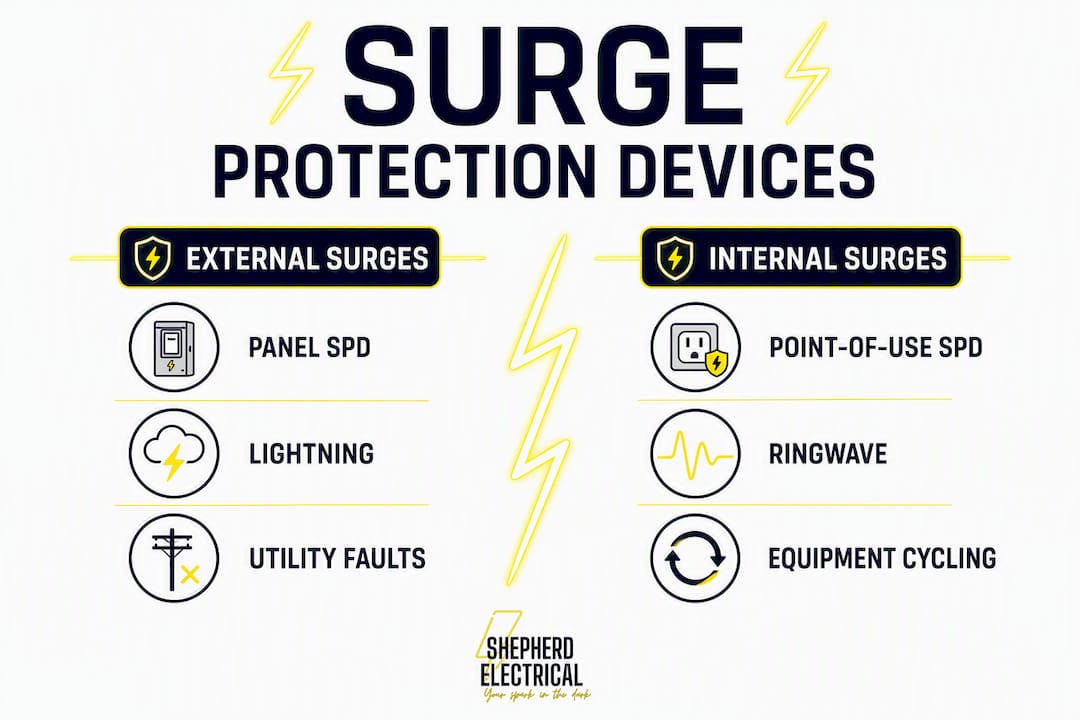
Internal surges are more frequent. External surges are larger. Both can damage your POS, but they call for different protective strategies.
External surges originate outside your building. Lightning is the obvious one, but utility grid switching events, transformer faults, and power restoration after an outage all send large transients down the service line. These are high-energy, low-frequency events. A panel-mounted SPD is your primary defense here.
Internal surges are generated inside your own building every day. Common retail sources include:
- Walk-in cooler and refrigeration compressors cycling on and off
- HVAC units starting and stopping
- Ice makers and exhaust blowers
- Commercial ovens and fryers with motor-driven components
- Elevator motors, if your space has them
These internal events produce what engineers call RingWave transients — high-frequency oscillations that standard MOV-based surge strips handle poorly. The transient is brief but repetitive, and it hits your POS hardware dozens of times a day.
Pro Tip: When selecting point-of-use SPDs for a retail environment, specifically look for devices rated for RingWave and high-frequency transients. A device tested only against the standard combination wave may not catch the transients your refrigeration equipment generates.
Which devices actually protect your POS equipment?
No single device covers every risk. The right answer is combining the right tools for each layer of the problem.
| Device Category | Primary Protective Role | External Surge Protection | Internal RingWave Protection | Maintenance Needs | Best Placement |
|---|---|---|---|---|---|
| Panel-mounted SPD (Type 1/2) | Diverts high-energy surges at service entrance | Strong | Moderate | Inspect annually; replace after major events | Main panel or subpanel |
| Point-of-use SPD (Type 3) | Clamps residual surges at the device level | Moderate (downstream only) | Moderate to strong | Check indicator lights; replace when degraded | At each POS terminal |
| Power-quality filter (series-filter) | Limits surge current, voltage, and duration without sacrificial components | Moderate | Strong | Low; no MOV to wear out | At each POS terminal |
| UPS (battery backup) | Provides runtime and orderly shutdown during outages | Minimal alone | Minimal alone | Battery replacement every 3–5 years | At each POS terminal |
| Consumer-grade surge strip | Basic over-voltage shunting | Weak | Weak | Degrades silently; no reliable indicator | Not recommended for POS |
A few points worth understanding before you buy anything:
- Panel-mounted SPDs (Type 1 and Type 2) handle the large external events. They divert high-energy transients before they reach branch circuits. Multi-stage coordination places high-energy devices upstream and fast-clamping devices downstream to combine capacity with low let-through voltage.
- Point-of-use SPDs and power-quality filters catch what gets through the panel. For retail, a series-filter design is worth considering. MOV-based devices are sacrificial — they absorb surges until they wear out, and they can fail silently. Series-filter designs limit surge current and voltage without that degradation problem.
- A UPS is not a surge protector. Professionals recommend combining a power conditioner or high-performance SPD at the POS terminal with whole-building protection and a UPS where runtime is needed. The UPS keeps your system alive during a brief outage so you can save data and close transactions. It does not replace dedicated surge suppression.
- Consumer-grade surge strips from a big-box store are the weakest option. They offer minimal clamping, no RingWave protection, and no reliable end-of-life indicator.
Selection tips:
- Confirm UL 1449 listing on every SPD you purchase.
- Match the kA rating to your environment — higher for main panel devices, lower acceptable at point-of-use.
- For retail with refrigeration or HVAC on shared circuits, prioritize RingWave-rated point-of-use devices.
- Never use a consumer strip as your only protection for a POS terminal.
How should you set up layered protection for a retail POS?
The most reliable approach combines a service-entrance SPD, a subpanel SPD, point-of-use filtering at each register, and a UPS where you need runtime — all anchored by a low-impedance ground.
The layered defense model for retail POS: Type 1 or Type 2 SPD at the main service entrance → Type 2 SPD at any subpanel feeding the POS area → Type 3 SPD or power-quality filter at each register → UPS at each terminal where transaction continuity matters. Every layer depends on a grounding resistance below 5 ohms to work correctly.
Here is how to build it out:
- Add subpanel protection — If your POS circuits run off a subpanel, add a Type 2 SPD there. This second stage reduces let-through voltage further.
- Protect each POS branch circuit. A dedicated circuit for each register reduces the chance that other equipment on the same circuit generates interference. Dedicated circuits for POS equipment are a standard recommendation for retail installs.
- Verify grounding. SPD effectiveness depends entirely on a low-impedance grounding path. The NEC allows up to 25 ohms, but the industry standard for sensitive electronics is 5 ohms or less. Have an electrician measure it and remediate if needed.
Pro Tip: Ask your electrician for written coordination documentation showing SPD types, placement, and ratings. Confirm every device carries a UL 1449 listing and that in-series overcurrent protection is in place. That paperwork matters if you ever need to file an insurance claim after a surge event.

Is surge protection required by code for retail businesses?
NEC Article 230.67 requires Type 1 or Type 2 SPDs at services supplying dwelling units, and the 2023 NEC expanded those requirements further into additional occupancy types. Commercial retail settings are not universally mandated to have point-of-use SPDs under current code, but the direction of NEC and NFPA updates is clearly toward broader requirements.
What that means practically: your local inspector may not flag a missing point-of-use SPD today, but panel-level protection is increasingly expected, and coordinated SPD installations per NEC/NFPA guidance are the professional standard. UL 1449 is the listing standard inspectors verify when checking SPD products — conductor sizing, overcurrent protection, and manufacturer installation instructions all factor into a passing inspection.
NEC Article 230.67 now mandates SPDs at residential services and is expanding into commercial applications with each code cycle. Even where not yet strictly required for retail, installing coordinated SPDs is a best practice that protects your equipment and your compliance posture.
Ask your electrician or inspector these questions before any installation:
- Is the SPD UL 1449 listed?
- What Type (1, 2, or 3) is specified for each location?
- Has the coordination between upstream and downstream devices been documented?
- Has grounding resistance been measured and verified?
What does installation cost and how long does it take?
A point-of-use SPD swap takes a few hours. A coordinated panel-plus-point-of-use installation with grounding remediation can run a full day or more and typically requires a permit and inspection.
| Work Category | Typical Low | Typical Median | Typical High | Main Cost Driver |
|---|---|---|---|---|
| Point-of-use SPD (per terminal) | — | $150 | — | Device grade, labor rate |
| Panel-mounted SPD (Type 1/2) | — | $600 | — | Panel access, device rating |
| Power-quality filter (per terminal) | $150 | — | — | Filter technology, brand |
| Combined panel + point-of-use job | — | — | — | Number of terminals, grounding condition |
| Grounding remediation | — | — | —+ | Existing electrode condition, soil type |
Note: These are ballpark ranges for the Edmond and OKC metro area. Your actual cost depends on panel condition, number of POS terminals, permit fees, and whether grounding work is needed. Get a site-specific quote.
Decision points to work through before scheduling:
- How many POS terminals do you have, and are they on dedicated circuits?
- What is the current condition of your main panel? An aging panel may need assessment before SPD installation.
- Has grounding resistance ever been measured at your location?
- What is your acceptable downtime window for the install?
- Does your jurisdiction require a permit for panel-level SPD work?
Timeline:
- Site assessment and grounding test: 1–2 hours
- Material procurement: 1–7 days depending on device availability
- Installation and testing: 2–8 hours for point-of-use only; 1–2 days for a full coordinated system
- Inspection scheduling: varies by jurisdiction, typically 3–10 business days after permit submission
How do you maintain surge protection and know when to replace it?
SPDs need periodic inspection. Some types require replacement after absorbing a significant surge event, and they can fail silently without a visible indicator.
Annual maintenance steps:
- Check the status indicator light on every point-of-use SPD. A failed or degraded MOV-based device often shows a red or no-light condition.
- Inspect panel-mounted SPDs for physical damage, discoloration, or tripped internal breakers.
- Have an electrician verify grounding resistance annually or after any major electrical work nearby.
- Log any surge events, power outages, or unexplained POS reboots. Patterns point to protection gaps.
- Check UPS battery health and replace batteries on the manufacturer’s schedule, typically every 3–5 years.
Signs your devices need replacement:
- Status indicator shows failure or protection-lost condition
- POS reboots or glitches increase after a known storm or grid event
- Clamping voltage has risen above the device’s rated let-through voltage (requires a meter test)
- The device has reached the manufacturer’s stated end-of-life or absorbed-energy limit
- Physical signs: burn marks, melted housing, unusual odor near the device
For annual electrical maintenance, treating your SPDs the same way you treat smoke detectors — check them on a schedule, replace them when they signal failure — keeps your protection active rather than theoretical.
Common myths small retailers believe about surge protection
Several widely held beliefs leave POS systems exposed. Here are the ones that cause the most real-world damage:
Myth 1: “My UPS protects against surges.” A UPS provides battery runtime and orderly shutdown. It is not a substitute for dedicated surge suppression. Most UPS units include basic MOV-based protection, but that is not the same as a coordinated SPD system. Combining a power conditioner or high-performance SPD with a UPS is the correct setup.
Myth 2: “The power strip I bought at the hardware store is good enough.” Consumer-grade strips offer minimal clamping voltage, no RingWave protection, and no reliable end-of-life signal. They degrade silently. A strip that protected your register last year may offer no protection today.
Myth 3: “One device protects the whole building.” A panel-mounted SPD handles large external surges at the service entrance. It does not eliminate the internal transients generated by your own equipment. Point-of-use protection at each terminal is still required.
Myth 4: “If the hardware seems fine, the power is fine.” Many recurring POS glitches blamed on software are actually power-quality problems. Phantom reboots, frozen screens, and intermittent card-reader failures often trace back to dirty power rather than a software bug.
Pro Tip: Before replacing POS hardware or calling your software vendor for the third time on the same issue, have an electrician test for dirty power and check your point-of-use protection. The fix is often a $150 power-quality filter, not a $600 hardware swap.
What electricians check when assessing POS surge protection
Internal RingWave transients cause the majority of real-world POS damage. That means the most important protection is at the point of use, backed by solid grounding — not just a panel device installed and forgotten.
A contractor-ready assessment checklist:
- Measure grounding resistance at the service entrance and at POS branch circuits. Target below 5 ohms.
- Verify bonding between equipment grounding conductors and the grounding electrode system.
- Confirm UL 1449 listing on all installed SPDs.
- Document SPD types and placement: Type 1 or 2 upstream, Type 3 at point of use.
- Test clamping voltage after installation and record baseline readings.
- Label all protected circuits at the panel and at each point-of-use device.
- Provide the owner with a maintenance schedule and replacement thresholds for each device type.
- Verify in-series overcurrent protection is in place for all panel-mounted SPDs.
Pro Tip: Request written coordination documentation from your electrician before they leave the job. It should list every SPD by type, location, kA rating, and UL listing number. That document is your proof of a properly coordinated system and your starting point for any future maintenance call.
Key Takeaways
Layered surge protection — panel SPD, point-of-use filtering, verified grounding below 5 ohms, and a UPS for runtime — is the only approach that reliably keeps POS systems running through both external strikes and the daily internal transients your own equipment generates.
| Point | Details |
|---|---|
| Internal surges dominate | Roughly 80% of damaging transients come from equipment inside your building, not lightning. |
| Layered defense is required | Panel-mounted SPD plus point-of-use filtering covers what no single device can handle alone. |
| Grounding is the foundation | Grounding resistance below 5 ohms is the industry standard for sensitive electronics; SPDs fail without it. |
| UPS is not surge protection | A UPS provides runtime during outages; pair it with a dedicated SPD or power-quality filter at each terminal. |
| Shepherdelectricalconstruction | Offers on-site surge audits, panel SPD installation, and point-of-use protection for Edmond and OKC-area businesses. |
The part most electricians skip telling you
The conversation around surge protection almost always starts with lightning. It is the dramatic scenario, the one that makes sense to a business owner who has never thought about power quality. But lightning is the rare event. What is actually destroying POS hardware in retail shops across Edmond and the OKC metro is the refrigeration compressor that cycles 40 times a day on the same circuit as the register.
That distinction matters for how you spend your protection budget. A panel-mounted SPD is necessary, but if you stop there, you have addressed the rare event and ignored the daily one. The point-of-use filter at each terminal is the device that actually intercepts the transients your own equipment generates. Skipping it because the panel device is already installed is the single most common gap in retail electrical protection.
There is also a grounding problem that rarely gets discussed in plain language. An SPD that is connected to a high-impedance ground does not work correctly. The energy has nowhere to go, clamping voltage rises, and the device that was supposed to protect your hardware becomes nearly useless. Measuring grounding resistance is a five-minute task for a licensed electrician. Most retail owners have never had it done.
Surge protection for your Edmond or OKC business, done right
Shepherdelectricalconstruction handles the full scope of commercial surge protection for small businesses in Edmond, North OKC, NW OKC, Deer Creek, The Village, Nichols Hills, Arcadia, Jones, and surrounding areas. That means a site assessment, grounding resistance measurement, panel-mounted SPD installation, point-of-use filtering at each POS terminal, and a written maintenance schedule before we leave.
Services include surge audits, panel-mounted SPD installation, point-of-use power-quality filter installation, grounding remediation, dedicated circuit wiring for POS equipment, and UPS coordination. Every installation follows NEC/NFPA guidelines and uses UL 1449-listed devices.
If your registers are glitching, your card readers are failing, or you have never had a surge protection audit, that is the place to start. Call (405) 406-1026 or text (405) 288-4876 or book online to schedule your assessment.
Useful sources
Authoritative references used in this article, recommended for owners and electricians who want to go deeper:
- NEC Code Requirements for Surge Protection (Leviton) — Plain-language summary of Article 230.67 and the 2023 NEC expansions; best starting point for code context.
- NEC Requirements for Surge Protective Devices (Eaton) — Technical detail on SPD types, installation requirements, and industry impact; useful for contractors.
- PQ Filters Increase POS Uptime (Zero Surge) — Case study on power-quality filter retrofits across more than 1,000 retail locations; best evidence for ROI of point-of-use filtering.
- How to Protect Against Power Surges (Zero Surge) — Practical overview of dirty power and its effect on POS and retail electronics.
- Surge Protection Systems: Whole-Building and Point-of-Use (Electrical Trade Network) — Technical reference on coordinated SPD placement, UL 1449, and grounding requirements; best for contractor checklists.
- Do I Need Surge Protection for My Business? (All South Lightning Protection) — Covers grounding resistance guidance and the 5-ohm standard for sensitive electronics.
- Point of Sale Surge Protection (Best Surge Protector) — Retail-specific guidance on internal transient sources and RingWave-rated device selection.
FAQ
Are surge protectors actually necessary for POS systems?
Yes. Voltage transients — both from external sources like lightning and internal sources like refrigeration cycling — cause data corruption, hardware failure, and unplanned downtime. A layered SPD setup prevents most of that damage.
Are surge protectors required by code for commercial retail?
NEC Article 230.67 mandates Type 1 or Type 2 SPDs at residential services, and the 2023 NEC expanded those requirements. Commercial retail installs are not universally mandated to have point-of-use SPDs yet, but panel-level protection is increasingly expected and coordinated installations are the professional standard.
Is surge protection mandatory under the 2023 NEC?
The 2023 NEC expanded SPD requirements beyond dwelling units into additional occupancy types. Whether your specific retail space falls under a mandatory requirement depends on occupancy classification and local code adoption — confirm with a licensed electrician or your local authority having jurisdiction.
Does a UPS replace the need for a dedicated surge protector?
No. A UPS provides battery runtime during outages and basic over-voltage protection, but it is not a substitute for a dedicated SPD or power-quality filter. Professionals recommend pairing a UPS with a dedicated point-of-use SPD at each POS terminal for complete protection.
How often should surge protection devices be replaced?
Inspect SPDs annually and after any major surge event. MOV-based devices degrade with each absorbed transient and should be replaced when the status indicator signals failure or after a significant storm event. Series-filter designs have longer service lives but still require annual visual inspection.
Recommended
- Why Protect Electrical Systems: Safety and Savings Guide
- Business Power Outage Preparedness Tips for Owners
- How to Maintain Commercial Outlets: 2026 Safety Guide
- Whole-Home Surge Protection in Edmond, OK
Need help with this at your home?
Shepherd Electrical helps Edmond and OKC metro homeowners with residential electrical service, repairs, upgrades, panels, EV chargers, solar, and backup power. Free estimates are available, and workmanship is backed by a lifetime guarantee.